
From blank screen to live signage in three steps
No player to buy and no technician to call. If the screen runs Android or a modern browser, it can run Telvory Signage.
Step 1
Get the screen ready
Install the free APK on an Android TV, Google TV, Android box or tablet. No Android? Open screen.telvorylive.com in the screen's browser.
Step 2
Pair it with a code
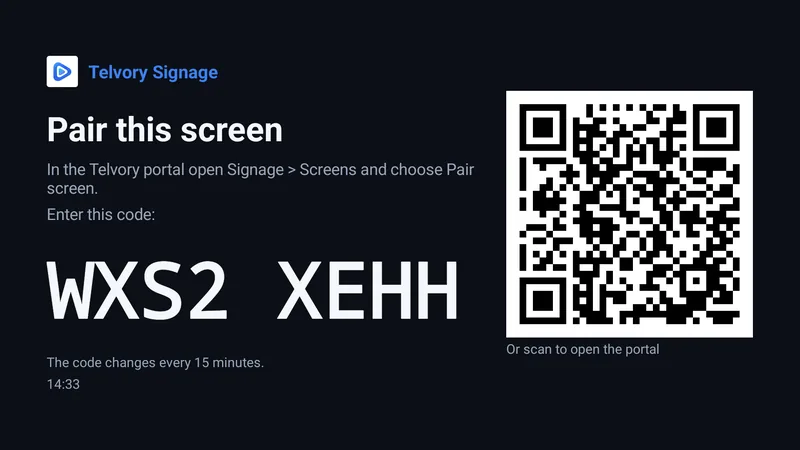
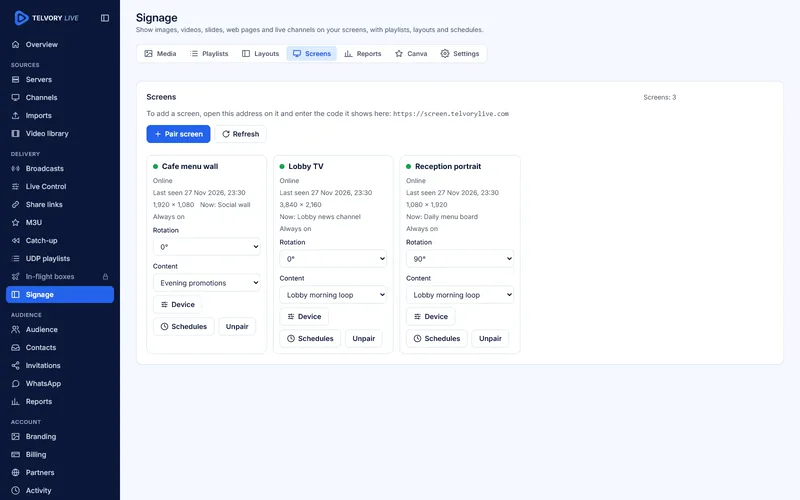
The screen shows an 8-character code and a QR code. In the portal open Signage > Screens > Pair screen and type it. The screen is now yours.
Step 3
Publish your content
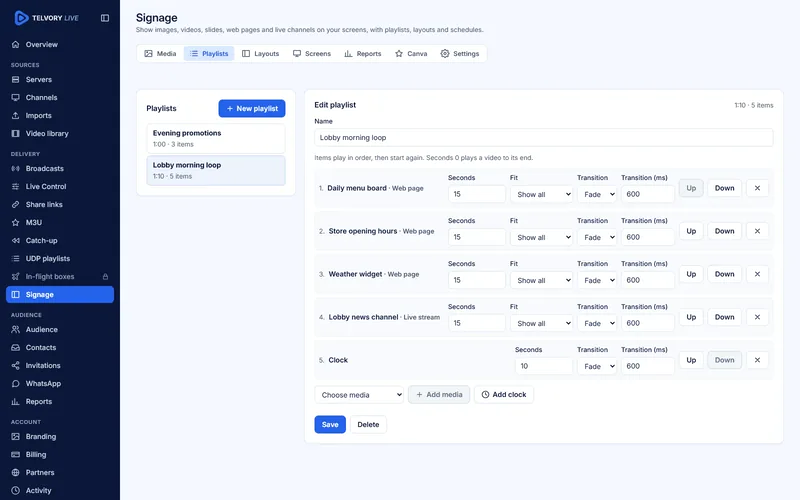
Upload images, video and PDFs, build playlists and layouts, add schedules. Screens check for changes every 30 seconds and download them on their own.
What happens on the screen
Everything is cached first
Each file is downloaded before it plays, so playback continues offline and after a reboot.
The schedule runs on the screen
The player works out what to show from its own clock, so it keeps following your schedule without internet.
It reports every minute
Online status, now playing, cache state and plays reach the portal every 60 seconds.
It sleeps on schedule
Screen on/off schedules: full power control on supported devices, black screen on others.
What you need
- A screen with Android 6 or later, or a modern browser
- Internet to pair and to receive changes
- A free Telvory account (up to 3 screens free)
Start with three screens, free
Pair your first screen in minutes. Move to a paid plan when your network grows.